HLS proxy-cache through Nginx
Why a HLS proxy cache?
MistServer creates an individual feed for every viewer from one input. This has great advantages in that every viewer has their own feed and cannot affect each other. This however is not an advantage when you're recreating the same fragments for everyone especially when TS fragment generation is one of the more CPU intensive tasks when it comes to packaging.
So the HLS proxy cache allows you to store a segment temporary and forward it to any viewer requesting the same segment after the first. Basically create it once, then re-use it while it's in buffer and finally remove it when it should no longer be available. This lowers the CPU usage for every viewer after the first requester significantly.
Playlists will be at the normal address location, segments however will all be forwarded to a local recorded file location & shared through Nginx.
Why Nginx?
Honestly, every webserver can handle this. The major reason why we pick Nginx is that it's something we're familiar with and know how to set up. It does help that it often comes out slightly ahead of other web servers when tested online, however if we were to be honest the differences are minimal. So you can use this setup for any other web server as well, you would just have to look up how a reverse proxy is set up or feel free to contact us for help if you really cannot figure it out.
Requirements
- Webserver application (Nginx)
- MistServer development version (script below)
- Text editor
Preperations
Ulimit increase
Every OS has a limit in how many files may be open at the same time. This limit could be high or low, in any case it's smart to verify what your current one is set at and increase it if it's too little. You usually view this limit by opening /etc/security/limits.conf and adding a rule for the Nginx user have an increased open file limit:
USER soft nofile 65535
USER hard nofile 65535
Where USER is the USER of nginx, usually either http or www-data.
Nginx config
Nginx has various styles to note the configuration, it could be all in one file or in multiple. Generally though there's a http and a server section. If you open the configuration files Nginx has it should make sense quite quickly.
httpneeds the setup for the caching proxy.serverneeds the location for the caching proxy
Nginx HTTP edit
This can often be found at: /etc/nginx/nginx.conf
The following edits need to be made:
worker_connections- The amount of connections that can be open, this doesn't have to be as high as your server limit, but we do recommend at least 1024
worker_rlimit_nofile- Setting this makes sure there's the same file limit as set serverwide
http proxy_cache- This sets the location of the cache and the size. We've set it to
/tmpso it's in RAM. This can be any location within the system though, change it accordingly. You can also set the maximum size and when files are considered inactive.
- This sets the location of the cache and the size. We've set it to
proxy_temp- temporary path within the proxy, needed for setup.
Example from Nginx configuration
user www-data;
worker_processes auto;
worker_rlimit_nofile 1048576;
pid /run/nginx.pid;
error_log /var/log/nginx/error.log;
include /etc/nginx/modules-enabled/*.conf;

events {
        worker_connections 1024;
        # multi_accept on;
}


http {

  proxy_cache_path  /tmp/www-cache levels=1:2 keys_zone=my-cache:8m max_size=100m inactive=6m;
  proxy_temp_path /tmp/www-cache/tmp;

}
Nginx Server edit
For some Nginx configurations this is within the same /etc/nginx/nginx.conf file, however we've seen this often loaded in from another place, quite common seems to be: /etc/nginx/sites-enabled/default. You should be able to tell where Nginx is loading these from by looking at Nginx itself.
location /hlscache/- This sets the HLS cache location & allows buffering & uses the proxy cache for this path specifically. MistServer then needs to be told to use this location for HLS segments specifically.
    server {

        location /hlscache/ {
          add_header X-Cache-Status $upstream_cache_status;
          proxy_ignore_headers Set-Cookie;
          proxy_cache my-cache;
          proxy_cache_valid  200 302  6m;
          proxy_cache_valid  404      5s;
          proxy_pass http://mist_upstream/;
          proxy_set_header X-Real-IP $remote_addr;
          proxy_buffering on;
          proxy_http_version 1.1;
          proxy_set_header Upgrade $http_upgrade;
          proxy_set_header Connection "Upgrade";
          proxy_read_timeout 600s;
          proxy_set_header Host $host;
          proxy_set_header X-Mst-Path "$scheme://$host/mist";
          add_header Access-Control-Allow-Private-Network true;
        }
MistServer setting:
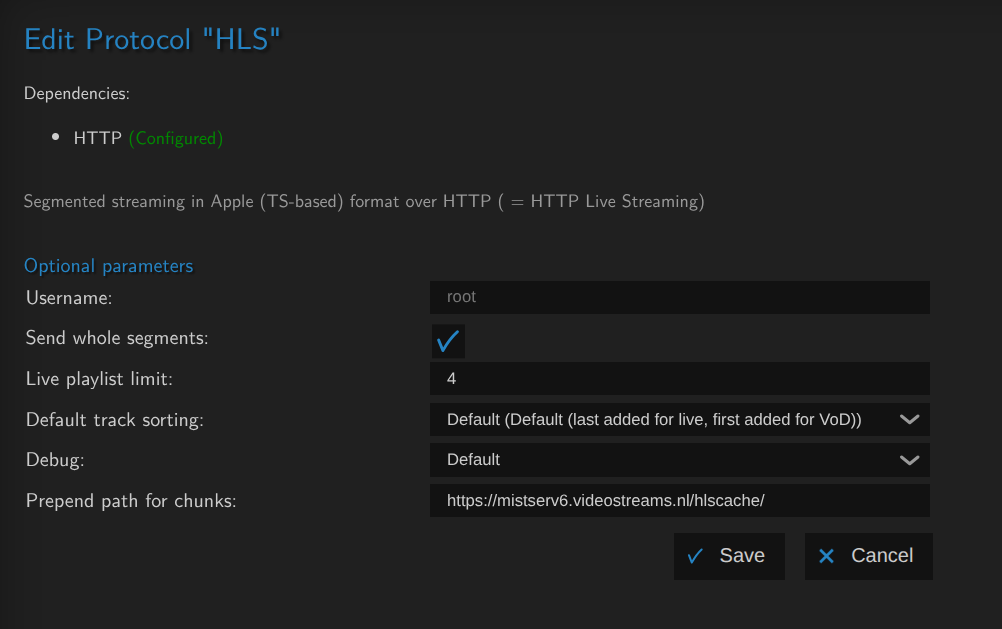
- Send whole segments ticked on.
- Prepand path for chunks:
https://YOURSERVERNAME/hlscache/
Technically //YOURSERVERNAME/hlscache/ could work as well, but using https:// at the start enforces the use of https, which honestly makes sense anyway.
If you want to see if you set it up correctly you'll need to open one of your HLS streams and see where the segments come from.
If set up correctly you'd see index.m3u8 come from normal /hls/ paths, and the segments from /hlscache/.
Opening the index.m3u8 in a text editor should also review the path.