Resume support / Push input disconnect behaviour
What is Resume support within MistServer?
Push disconnect behaviour is often referred towards as resume support, more specifically push input resume support. This determines what MistServer should do when a live source disconnects, whether it's because of an time out or because of an planned stop.
MistServer has 3 options to choose from:
- Fully disconnect the buffer and set the stream to offline (default).
- Keep the buffer in memory for X seconds and completely restart if the push restarts
- Keep the buffer in memory for X seconds and attempt to resume if possible
All of these settings can be set up while creating or editing a Stream within MistServer and can be found at the optional parameters.
Setting up resume support
Resume support has 1 required setting and a few additional optional parameters that are handy to set up as well.
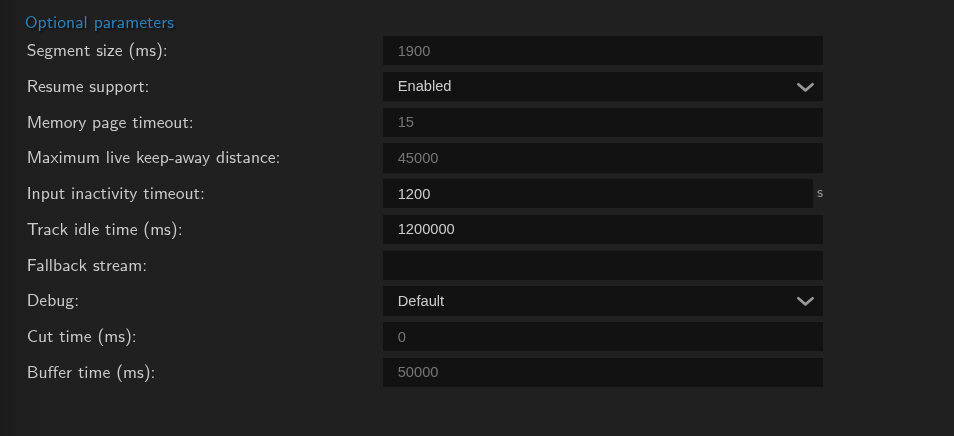
- Resume support: Here you set the resume support/ push input disconnect behaviour option.
- Input inactivity timeout (s): This is the amount of time in seconds stream metadata will be stored when the source disconnect.
- Track idle time (ms): This is the amount of time in milliseconds a track is allowed to be behind before it is removed and track data is removed.
- Buffer time (ms): The time in milliseconds stream data should be kept.
Input inactivity timeout and track idle time Might seem the same, but there's a slight difference:
- If a track is dropped that track can no longer be resumed. Pushes will land on new tracks
- If all inputs have dropped, the entire stream is offline and can no longer be resumed
Buffer time is the amount of time in milliseconds old stream data should be stored for playback. Note that a track does not require any stream data in order to be "resumed". It's perfectly fine to have a time out for 10 minutes and a buffer for 1 minute and still resume a stream after a 8 minute break. There will just be no "old" stream data to seek back towards.
Fully disconnect the buffer and set the stream to offline
This is the default for MistServer. The behaviour here is that once the source is lost, the stream is set to offline immediately and viewers will be dropped. This opens up the endpoint immediately for a new push & allows for fallback behaviour to take over should that be set up. The main reason why this is the default is because it's generally the safer bet when interacting with other applications as a "new push" is often easier than resuming a previous existing one.
Pros:
- Very clear behavior, source is no longer active? Stream is offline
- Endpoint is immediately open for a "new" stream
- Fallback options can trigger immediately
Cons:
- Processes will immediately exit
- Recordings will stop immediately
Keep the buffer in memory for X seconds and completely restart if the push restarts.
This setting allows any viewers to watch until the end and then be dropped. Though new viewers will generally see the last few seconds of the stream and then be stuck in buffering. The upside here is that you have a guarantee that any existing viewer will get to see the full stream before it goes offline. Meanwhile the endpoint is still opened up and any new push coming in will destroy the old buffer and immediately make the new stream available.
Pros:
- Every viewer can see the end
- Recordings or pushes that were delayed on purpose can reach the end
- The endpoint is still immediately available for any new push
Cons:
- Restarting the source will destroy the old buffer
- Processes/playback will hang at the last second as the stream does not shut down immediately
- Stream might seem online while it no longer is.
Keep the buffer in memory for X seconds and attempt to resume if possible
In this mode MistServer will keep the metadata and stream data stored (depending on relevant settings) and will determine from the metadata whether any new incoming streams can be resumed. Should the metadata match the stream will continue with a new timestamp and resume with a gap of data missing between the last active push and the now new active push.
Pros:
- Any connected processes/streams can continue where left of
- Track numbers and active time will continue
- Slightly more stability for bad connections
Cons:
- Most other applications or protocols are not build for this behaviour, pushes/players would still show offline status
- Streams might seem online while no longer active
- Gaps in stream data for processes, recordings or playback can cause issues.
When to select a specific mode
For most users the default will make most sense as any new push will be instantly usable and shouldn't cause any issues with previous stream data.
However should you be sending out an event that must stay live and never drop your best bet is by attempting resume support. Should the source drop & reconnect multiple times you might see corruption, but the full stream & buffer will be available for the entire event.
Keeping the buffer in memory and performing a complete restart upon a new push is an sort of in between mode, where you attempt to use the buffer as time to get your stream back live & then reset everyone's connection to the new stream to hopefully prevent any weird issues.