Caching
Overview
MistServer uses shared memory by default to store active media data in RAM. Content held in shared memory can be served to viewers with minimal latency and high efficiency. This setup works exceptionally well for live streams and locally stored Video-on-Demand (VoD) content.
However, enabling disk caching is recommended if you:
- Stream VoD content stored on remote or high-latency storage (e.g., S3, HTTP sources, network shares).
- Serve high volumes of concurrent viewers over segmented protocols like HLS or DASH.
Because segmented outputs are dynamically created for each request, generating them repeatedly for hundreds or thousands of viewers can become CPU-intensive. Caching these segments allows MistServer to generate them once and re-serve them to all subsequent viewers.
Caching requires reserving dedicated disk space, as shared memory is designed for temporary, volatile storage rather than persistent cache files.
Setting Up Caching
You can configure the cache location and size via the MistServer Management Interface or directly in the JSON Configuration / API.
Method 1: Management Interface
Navigate to the General settings panel:
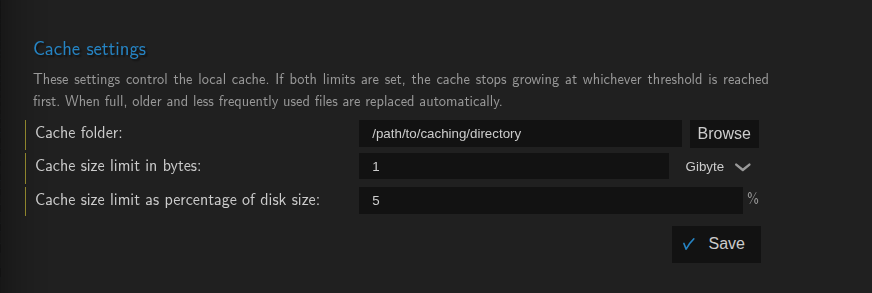
Configure the following parameters:
path: Directory where cache files will be saved. MistServer attempts to create the directory automatically if it does not exist.bytes: Maximum cache size limit in bytes.percent: Maximum storage limit as a percentage of the host drive capacity (0.000to100.000). Setting this to0disables percentage-based capping (unlimited).
- While any type of storage can serve as a cache faster storage environments such as SSDs are superior.
- Usage of
tmpfsas cache directory can be done, however unrecommended as it conflicts both with the main shared memory usage and is not suited for possible long term storage. - If both
bytesandpercentlimits are defined, MistServer automatically enforces whichever limit evaluates to the smaller storage size.
Method 2: API / JSON Configuration
Add the cache object under config in your server settings:
{
  "config": {
    "cache": {
      "path": "/path/to/caching/directory",
      "bytes": 123456789,
      "percent": 5.00
    }
  }
}
To remove or disable caching, clear or omit the path property rather than setting sizes to zero.
Caching Folder Structure
Inside your configured cache directory, MistServer generates three primary file types:
-
.dtsh files: Stream metadata and index headers.
-
MstData pages: Cached raw media buffer data.
-
HLS / DASH segments: Generated output segments.
Unique Stream Identifiers (UUIDs)
Cache files are named using calculated UUIDs:
-
Live Streams: Identifiers are dynamically generated per live session.
-
VoD Streams: Identifiers are deterministically derived from the source file's .dtsh header.
If two VoD streams share identical underlying media sources, they will resolve to the same UUID. This allows MistServer to share cached data across multiple stream instances without redundant processing.
Automatic Cache Cleanup
When cache utilization approaches the configured limit (bytes or percent), MistServer automatically deletes cached files to free up space.
Cache retention follows a resource-cost strategy rather than a simple oldest file first model:
-
High-Priority Retained Files: Metadata (.dtsh) and expensive-to-generate buffers are retained longer.
-
First-to-Purge Files: Older, transient output files (such as inactive live HLS segments) are purged first.
Inspecting Cache File Ownership
MistServer writes stream attribution metadata to the Extended File Attributes (xattr) of each cache file.
To check which stream a specific cached file belongs to, run:
getfattr -d /path/to/caching/directory/cachedfile
Example Output:
user.mist.expiry="1793283400631"
user.mist.frequency="1024"
user.mist.gentime="2"
user.mist.lastdecay="1793283322482"
user.mist.stream="stream_name"
user.mist.expiry: Unix time (milliseconds) that describes when the content should no longer be relevant and can be cleared upuser.mist.frequency: A score given to how often the cached file is accessed.user.mist.gentime: Time in milliseconds that was necessary to generate the fileuser.mist.lastdecay: Unix time (milliseconds) when the frequency was last updateduser.mist.stream: The stream name that is associated with this cached file.
- Your underlying filesystem must support extended attributes (xattr) for metadata inspection to work properly.
- Only live content has an expiry score.
Clearing Cache for a Specific Stream
Deleting a stream configuration does not automatically purge its associated cached data from disk. You can clear a stream's cache manually:
Via the Interface
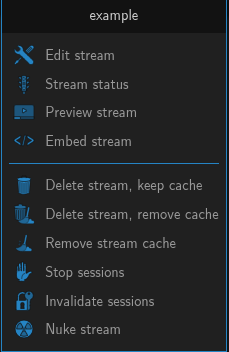
Navigate to the Streams panel, right-click on the desired stream, and select Remove Cache.
Via API / Socket Command
Send the following command to the MistServer management API:
["deletecache", "streamname"]